


- Posts: 1
SDKTool in SAM 2020-11-29 Mac distribution will not start
- Eric K Zeise
- Topic Author
Less
More
13 Dec 2020 08:37 #9107
by Eric K Zeise
SDKTool in SAM 2020-11-29 Mac distribution will not start was created by Eric K Zeise
SDKTool.app (November 29, 2020) in the sam-osx-2020-11-29 distribution exits with a "Library not loaded: @rpath/ssc.dylib" error without starting.
SDKtool.app in the SDKTool.app bundle (SDKTool.app/Contents/MacOS/SDKtool.app) exits with slightly more information:
dyld: Library not loaded: @rpath/ssc.dylib
Referenced from /Applications/NREL/SDKTool.app/Contents/MacOS/SDKtool
Reason: image not found
zsh: abort /Applications/NREL/SDKTool.app/Contents/MacOS/SDKtool
This behavior persists in MacOS 11.0.1, 10.13.6 and 10.11.6
SDKtool.app (May 21, 2019) in the sam-osx-2018-11-11-r4 distribution operates properly (per documentation).
SDKtool.app in the SDKTool.app bundle (SDKTool.app/Contents/MacOS/SDKtool.app) exits with slightly more information:
dyld: Library not loaded: @rpath/ssc.dylib
Referenced from /Applications/NREL/SDKTool.app/Contents/MacOS/SDKtool
Reason: image not found
zsh: abort /Applications/NREL/SDKTool.app/Contents/MacOS/SDKtool
This behavior persists in MacOS 11.0.1, 10.13.6 and 10.11.6
SDKtool.app (May 21, 2019) in the sam-osx-2018-11-11-r4 distribution operates properly (per documentation).
Please Log in or Create an account to join the conversation.
- sjanzou
Less
More
- Posts: 22
17 Dec 2020 01:08 - 17 Dec 2020 11:10 #9128
by sjanzou
Replied by sjanzou on topic SDKTool in SAM 2020-11-29 Mac distribution will not start
These instructions are for MacOS 11.0.1 Big Sur. For more about SDKtool, see
sam.nlr.gov/software-development-kit-sdk.html
.
1. Download SAM 2020.11.29 for Mac from sam.nlr.gov/download.html and open the sam-osx-2020-11-29.dmg disk image.
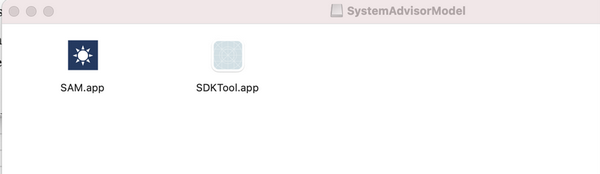
2. Open a Finder window, go to the Applications folder, and create a SAM_2020.11.29 folder.
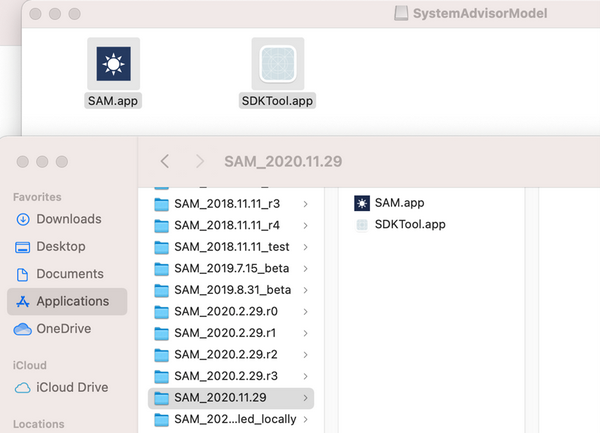
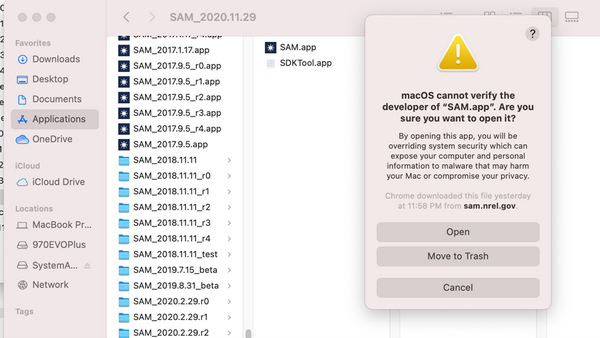
3. To run SAM, right-click the SAM app and click Open.
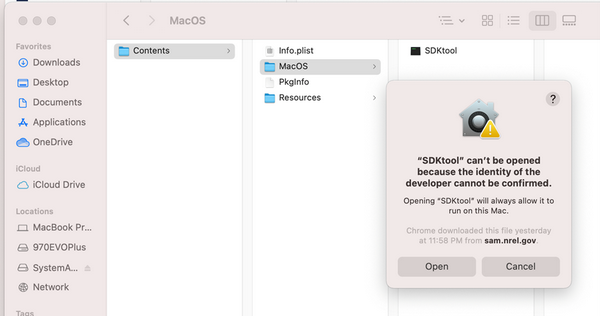
4. To open SDKtool, right-click the SDKTool app, click Show Package Contents and navigate to MacOS folder.
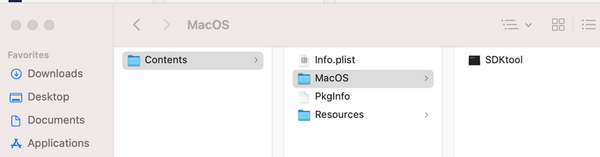
5. Right-click the SDKtool app and click Open.
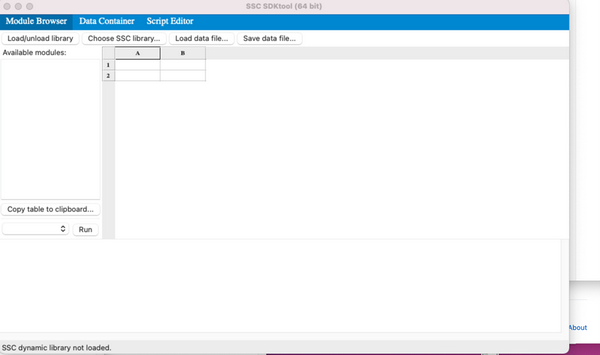
6. SDKtool opens with no SSC library loaded.
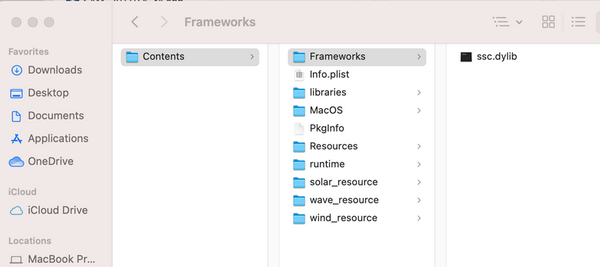
7. To load the SSC library, from the Finder Applications/SAM_2020.11.29 folder, right-click the SAM app, click Show Package Contents, and navigate to the Frameworks folder.
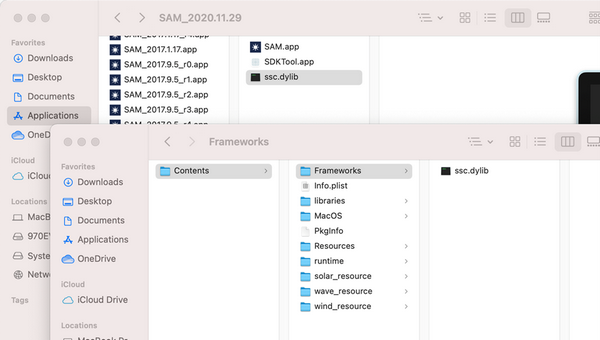
8. Copy and paste the ssc.dylib from Frameworks folder to the SAM_2020.11.29 folder.
9. In SDKtool, click Choose SSC library at the top of the window, and choose ssc.dylib from the SAM_2020.11.29 folder.
10. The module browser should display a list of modules from the library.
1. Download SAM 2020.11.29 for Mac from sam.nlr.gov/download.html and open the sam-osx-2020-11-29.dmg disk image.
2. Open a Finder window, go to the Applications folder, and create a SAM_2020.11.29 folder.
3. To run SAM, right-click the SAM app and click Open.
4. To open SDKtool, right-click the SDKTool app, click Show Package Contents and navigate to MacOS folder.
5. Right-click the SDKtool app and click Open.
6. SDKtool opens with no SSC library loaded.
7. To load the SSC library, from the Finder Applications/SAM_2020.11.29 folder, right-click the SAM app, click Show Package Contents, and navigate to the Frameworks folder.
8. Copy and paste the ssc.dylib from Frameworks folder to the SAM_2020.11.29 folder.
9. In SDKtool, click Choose SSC library at the top of the window, and choose ssc.dylib from the SAM_2020.11.29 folder.
10. The module browser should display a list of modules from the library.
Last edit: 17 Dec 2020 11:10 by Paul Gilman. Reason: images
Please Log in or Create an account to join the conversation.
- Dan
Less
More
- Posts: 16
17 Nov 2021 11:14 #10271
by Dan
Replied by Dan on topic SDKTool in SAM 2020-11-29 Mac distribution will not start
I get the following exception (MacOS Big Sur 11.5.2) when I try to open the SDKTool. It opened it with terminal:
Last login: Wed Nov 17 11:03:23 on ttys012/Applications/SAM_2020.11.29/SDKTool.app/Contents/MacOS/SDKtool ; exit;If you experience problems with multiprocessing on MacOS, they might be related to bugs.python.org/issue33725 . You can disable multiprocessing by editing your .boto config or by adding the following flag to your command: `-o "GSUtil:parallel_process_count=1"`. Note that multithreading is still available even if you disable multiprocessing.CommandException: No URLs matched: gs://geo-storage/{storage_id}/**CommandException: 1 file/object could not be transferred.➜ ~ /Applications/SAM_2020.11.29/SDKTool.app/Contents/MacOS/SDKtool ; exit;dyld: Library not loaded: @rpath/ssc.dylib Referenced from: /Applications/SAM_2020.11.29/SDKTool.app/Contents/MacOS/SDKtool Reason: image not found[1] 73212 abort /Applications/SAM_2020.11.29/SDKTool.app/Contents/MacOS/SDKtoolSaving session...completed.
Please Log in or Create an account to join the conversation.
- Paul Gilman
Less
More
- Posts: 5748
17 Nov 2021 21:48 #10277
by Paul Gilman
Replied by Paul Gilman on topic SDKTool in SAM 2020-11-29 Mac distribution will not start
Hi Dan,
Did you follow Steve's step-by-step instructions above to load the the library file?
Best regards,
Paul.
Did you follow Steve's step-by-step instructions above to load the the library file?
Best regards,
Paul.
Please Log in or Create an account to join the conversation.
- Dan
Less
More
- Posts: 16
18 Nov 2021 08:03 #10283
by Dan
Replied by Dan on topic SDKTool in SAM 2020-11-29 Mac distribution will not start
Yessir, I did.
Please Log in or Create an account to join the conversation.
Moderators: Paul Gilman