


- Posts: 3
IRR and PPA rate
- Upen
- Topic Author
Less
More
01 Mar 2026 21:36 #14501
by Upen
IRR and PPA rate was created by Upen
I am using SAM 2025.4.16 r1.
This post is about "financial" part of SAM.
I am trying to create a new 10MW PV project with "single owner" model.
As told in the help pages and on other web sources, SAM accepts US Dollars only. So, I've put all the input values converting it to INR.
After putting all the inputs, when the "Simulation" is finished, I am getting following message;
*******
IRR at end of analysis period is not a number (NaN). This can indicate that revenues are too low to cover costs, or that they are excessively high compared to costs.
IRR in target year is not a number (NaN). This can indicate that revenues are too low to cover costs, or that they are excessively high compared to costs.
NPV is $-1.78314e+09. A negative NPV indicates project costs are higher than revenues.
*******
Somehow, I am stuck with the IRR and PPA inputs.
In the Revenue section, there are two options;
Specify IRR target.
Specify PPA price.
If "Specify IRR target" is selected, a message appears below the selection saying - "The Specify IRR Target option is not available with the Use PPA Option on Electricity Purchases page. Either change the option on the Electricity Purchases page or use the Specify PPA option.
On the Electricity Purchases section, only two options are available.
Use PPA Rate or Market Prices.
Use Retail Electricity Rate(s).
The second optin - "Retail Electricity Rates" is specifically for United States only.
Because I live outside US, it is not available for me and I am bound to select PPA rate option only.
Now, here starts the real trouble.
Whatever PPA rate I put, I always get the same error as above.
Am I missing something? Is there any other section/page where I have to input something?
This post is about "financial" part of SAM.
I am trying to create a new 10MW PV project with "single owner" model.
As told in the help pages and on other web sources, SAM accepts US Dollars only. So, I've put all the input values converting it to INR.
After putting all the inputs, when the "Simulation" is finished, I am getting following message;
*******
IRR at end of analysis period is not a number (NaN). This can indicate that revenues are too low to cover costs, or that they are excessively high compared to costs.
IRR in target year is not a number (NaN). This can indicate that revenues are too low to cover costs, or that they are excessively high compared to costs.
NPV is $-1.78314e+09. A negative NPV indicates project costs are higher than revenues.
*******
Somehow, I am stuck with the IRR and PPA inputs.
In the Revenue section, there are two options;
Specify IRR target.
Specify PPA price.
If "Specify IRR target" is selected, a message appears below the selection saying - "The Specify IRR Target option is not available with the Use PPA Option on Electricity Purchases page. Either change the option on the Electricity Purchases page or use the Specify PPA option.
On the Electricity Purchases section, only two options are available.
Use PPA Rate or Market Prices.
Use Retail Electricity Rate(s).
The second optin - "Retail Electricity Rates" is specifically for United States only.
Because I live outside US, it is not available for me and I am bound to select PPA rate option only.
Now, here starts the real trouble.
Whatever PPA rate I put, I always get the same error as above.
Am I missing something? Is there any other section/page where I have to input something?
Please Log in or Create an account to join the conversation.
- Paul Gilman
Less
More
- Posts: 5748
02 Mar 2026 10:10 #14503
by Paul Gilman
Replied by Paul Gilman on topic IRR and PPA rate
Hi Upen,
The inputs on the Electricity Purchases page are suitable for retail electricity rates anywhere in the world.
By default, for a front-of-meter (FOM) financial model like Single Owner, when you choose Use retail electricity rates(s) on the Electricity Purchases page, the inputs are set up for a basic flat rate. If your project pays a flat rate for the electricity it purchases for night-time loads, battery charging, or other electrical loads during times when the system does not generate power, you can enter it as the "Buy Rate" in the energy charges rate table:
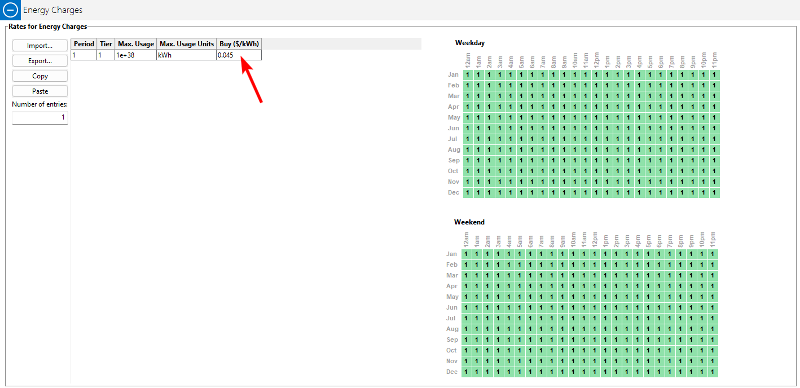
In that screenshot, the flat rate is 4.5 cents/kWh.
You can also define a more complex rate structure with fixed monthly charges, time-of-use (TOU) rates, and/or demand charges by entering the appropriate data under "Fixed Charge", "Energy Charges", and "Demand Charges".
The only part of that input page that is specific to the U.S. is the Search for Rates rates feature. It downloads rate data from the OpenEI Utililty Rate Database that contains data mostly for the U.S. but also for some other countries.
Best regards,
Paul.
The inputs on the Electricity Purchases page are suitable for retail electricity rates anywhere in the world.
By default, for a front-of-meter (FOM) financial model like Single Owner, when you choose Use retail electricity rates(s) on the Electricity Purchases page, the inputs are set up for a basic flat rate. If your project pays a flat rate for the electricity it purchases for night-time loads, battery charging, or other electrical loads during times when the system does not generate power, you can enter it as the "Buy Rate" in the energy charges rate table:
In that screenshot, the flat rate is 4.5 cents/kWh.
You can also define a more complex rate structure with fixed monthly charges, time-of-use (TOU) rates, and/or demand charges by entering the appropriate data under "Fixed Charge", "Energy Charges", and "Demand Charges".
The only part of that input page that is specific to the U.S. is the Search for Rates rates feature. It downloads rate data from the OpenEI Utililty Rate Database that contains data mostly for the U.S. but also for some other countries.
Best regards,
Paul.
Please Log in or Create an account to join the conversation.
Moderators: Paul Gilman